Tech Central

Frequently Asked Questions

  1. How do I get technical support?

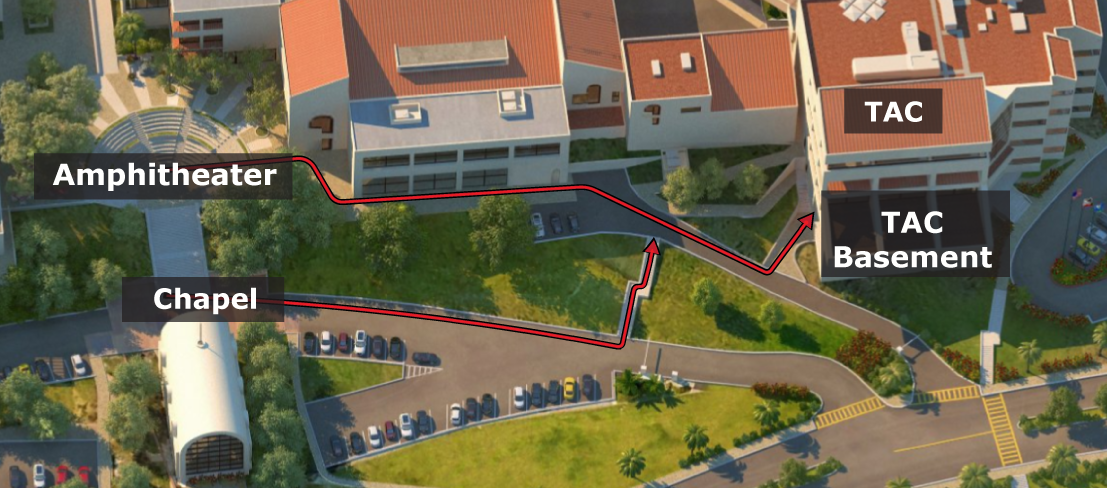
    Malibu: Students studying in Malibu can call or visit Tech Central for technical support during business hours or students can call the Help Desk at (310) 506-HELP (x4357) twenty-four hours per day, 7 days per week.

    Irvine, West LA, Encino, and Abroad: Students should call the Help Desk at (310) 506-HELP (x4357) or talk to their campus computer lab staff. Students can also call Tech Central for telephone support.

  2. How do I find computer labs and cyber cafes?

    Go to http://community.pepperdine.edu/it/instruction/instructionalsupport/labs.htm for information on where to find computer labs and cyber cafes on campus.

  3. My computer is slow, are there some things I can try myself before I bring it in?

    Yes. You can make sure that your Operating System (Windows or Mac OS) is up to date. Also, you can download and run the Microsoft Malicious Software Removal Tool. Following these steps may temporarily speed up your computer until you get a chance to bring it in for a thorough cleaning.

  4. I cannot connect to the Internet, where can I find support?

    Visit the IT website to learn more about connecting to the Internet at Pepperdine University.

  5. Does Pepperdine provide virus protection for free?

    Pepperdine provides free virus protection for all Windows operating systems, but not for Mac operating systems. Tech Central encourages all students to install anti-virus software. Windows anti-virus software, Trend Micro, can be downloaded free of charge.

    Intego Virus Barrier, anti-virus software for Macs, can be purchased at a discount from the Computer Store for $40.


Last modified: 01/31/2012

For question about fees or services call Tech Central at (310) 506-4811.