Reviewed AI Tools
Overview
Artificial Intelligence (AI) tools offer both opportunities and risks to transform education. To be allowed for use at Pepperdine University, all artificial intelligence (AI) tools must undergo the University's Tiered Trust evaluation process. When working with an AI tool, please refer to our AI Best Practices. Below, please find details about University-provided tools and AI tools that have been reviewed for potential use for University teaching, learning, research, and operations.
While we are here to support you, employees are individually responsible for ensuring their use of AI complies with the University's policies and guidance. Familiarity with these standards is an expectation of your role.
Understand Data Classification
A vital component of data protection relies upon our understanding of the data we store, use, or share. At Pepperdine University, data is classified into three categories: Public, Confidential, and RESTRICTED. Refer to the brief definitions below. For more details, please see the Information Classification and Protection Policy Schedules:
Public Data
This information is allowed anywhere with no specific protections. Examples: Email addresses, Campus Wide IDs, Course Catalog, Event notices.
Confidential Data
This information is permitted where protected by a Password. Examples: Email messages, Business records, Educational records.
RESTRICTED Data
Not permitted with any AI tool. This information is ONLY allowed with University-approved encryption. Examples: SSNs, CCNs, DLNs, Health records.
Understand Tool Statuses
After review by the Tiered Trust process, a tool will receive one of three possible statuses: Approved, Allowed, or Denied. Tools will also be associated with allowed data types.
Approved
This AI tool is allowed and supported by the University.
Allowed
This AI tool is permitted but not supported by the University.
Denied
Not permitted. Use of this tool is prohibited by the University.
Approved AI Tools
Pepperdine University has approved and supports the following tools. These AI tools have been carefully vetted for institutional use and the AI Oversight Committee recommends their adoption before other AI tools are considered. Use of these tools requires login with a Pepperdine University NetworkID account. Please refer to the allowed data types to ensure appropriate use.
| AI Tool | Plan | Cost | Status | Data Types Allowed |
|---|---|---|---|---|
| Google Gemini | Pepperdine (EDU Core) | Included | Approved | Public and Confidential. |
| Pepperdine (EDU Pro) | Monthly Fee | Approved | Public and Confidential. | |
| Zoom AI Companion | Pepperdine (EDU) | Included | Approved | Public and Confidential. |
Allowed AI Tools
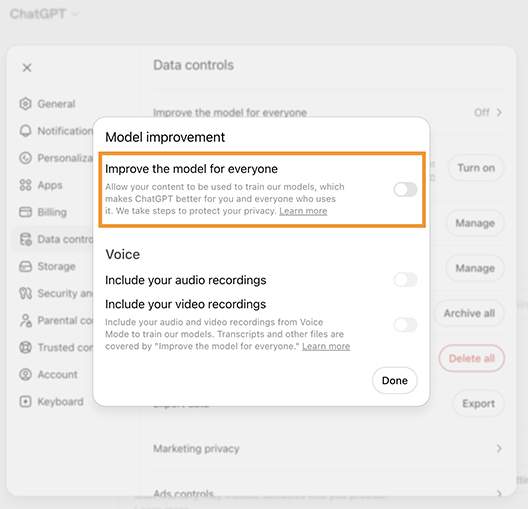
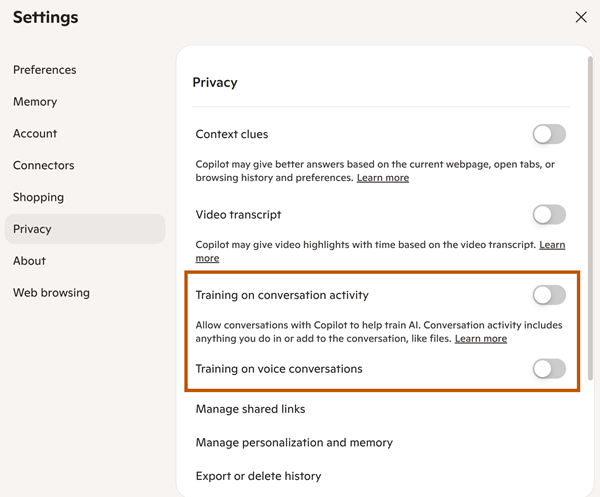
If Pepperdine University allows a tool, this means it is permitted but not centrally funded or supported. All "Allowed" AI tools must have training disabled. Specifically, you must disable training in the allowed AI tool's settings or confirm that the allowed AI tool does not use any Pepperdine data for training any large language model(s) associated with the AI tool. Please refer to and follow Pepperdine's AI Best Practices and the allowed data types to ensure appropriate use.
Stewarding the University's Resources
The University Code of Ethics calls all of us to manage our resources wisely. In addition to data security/privacy considerations and given that Pepperdine already offers Google Gemini for Education and Zoom AI Companion to the community, we ask that every employee (faculty and staff) consider carefully the academic and business purpose of any expense, including AI-related tools and services.
| AI Tool | Plan | Cost | Status | Data Types Allowed | Conditional Use |
|---|---|---|---|---|---|
| Apple Intelligence | Personal | Free | Allowed | Public only. | N/A. |
| Canvas IgniteAI | Business | Included | Allowed | Public and Confidential | Use of University data in a Canvas service other than Pepperdine Canvas or Digital Campus is not supported. |
| ChatGPT | Personal (Free or Paid) | Free or Monthly Fee | Allowed | Public only. | N/A. |
| Business | Monthly Fee | Allowed | Public and Confidential. | ChatGPT Conditions | |
| Claude AI | Personal (Free or Paid) | Free or Monthly Fee | Allowed | Public only | N/A |
| CollegeVine | Business | Annual Fee | Allowed | Public and Confidential | See Schedule B standard controls for Confidential information. |
| Genio (OSA Pilot) | Business | Annual Fee | Allowed | Public and Confidential | See Schedule B standard controls for Confidential information. |
| Google Gemini | Personal (Free or Paid) | Free or Monthly Fee | Allowed | Public only. | All University data must be stored in Pepperdine Google Gemini, not a personal Google account. |
| Grammarly | Business | Monthly Fee | Allowed | Public and Confidential | See Schedule B standard controls for Confidential information. |
| Hiration | Business | Annual Fee | Allowed | Public and Confidential | See Schedule B standard controls for Confidential information. |
| Microsoft Copilot | Personal (Free or Paid) | Free or Monthly Fee | Allowed | Public only. | N/A. |
| Business | Monthly Fee | Allowed | Public and Confidential. | Microsoft Copilot Conditions | |
| Ramp | Business | Annual Fee | Allowed | Public and Confidential | See Schedule B standard controls for Confidential information. |
| StarRez Intelligence | Business | Free | Allowed | Public and Confidential | See Schedule B standard controls for Confidential information. |
| Tableau (HR Pilot) | Business | Annual Fee | Allowed | Public and Confidential | See Schedule B standard controls for Confidential information. |
| YuJa Panorama | Business | Annual Fee | Allowed | Public and Confidential | N/A. |
| Zenphi | Pro, Ultimate, Business | Monthly Fee | Allowed | Public and Confidential | See Schedule B standard controls for Confidential information. |
| Zoom AI Companion | Personal (Basic or Paid) | Free or Monthly Fee | Allowed | Public only. | N/A. |
Denied AI Tools
Because of cybersecurity and data privacy concerns, the following AI tools are denied for any institutional use:
- DeepSeek AI
Questions and Comments?
For any inquiries and comments about any reviewed AI tools, please contact Jonathan See at jonathan.see@pepperdine.edu and Tim Bodden at tim.bodden@pepperdine.edu.
Final Reminders
Never share RESTRICTED information with any AI tool, approved or otherwise. If you are unclear of the type of data, do not share it with an AI tool.
- Faculty: Refer to the University's Academic AI Policy and consult your school or faculty handbook for additional AI guidelines on teaching, learning, and research.
- Staff: Consult with your supervisor for school or departmental guidelines on AI use in your role or area.
- Students: Always review your individual class syllabi and consult directly with your instructors regarding AI use and academic integrity.